

Weave designer#
The Weave designer extension generates woven glass-fiber fill geometry for PCB substrates and assigns homogenized or detailed materials to it in HFSS.
The extension provides a graphical user interface for configuration, or it can be used in batch mode via command line arguments.
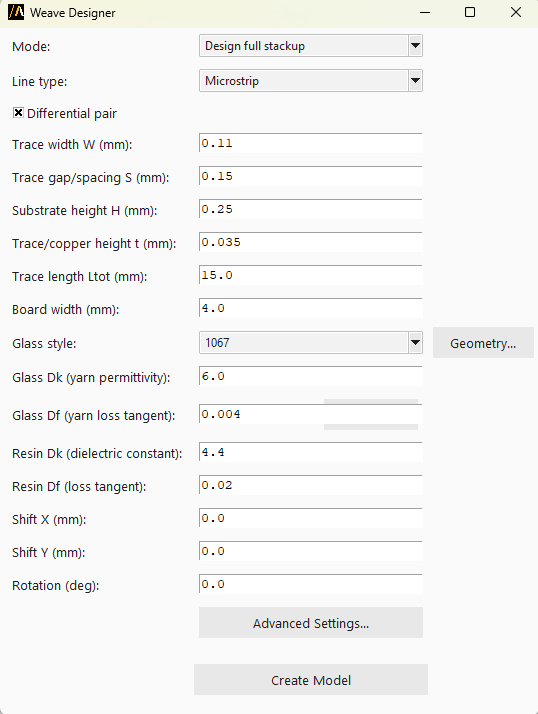
The following image shows the extension:
Features#
Build a full stackup (ground planes, substrate, trace, ports, and airbox) for a microstrip or stripline, differential or single-ended, and weave the glass fiber into it in one step.
Alternatively, weave the glass fiber onto one or more existing substrate objects in a design that already contains vias and routing (“Weave existing layout” mode), without touching the stackup.
Choose a predefined vendor glass style (weave pattern, pitch, and yarn geometry) or define a fully custom one.
Configure glass/resin Dk and Df, shift and rotate the weave pattern relative to the substrate, and expose low-level facet/sector settings in an Advanced Settings dialog.
Using the extension#
Open the Automation tab in the HFSS interface.
Locate and click the Weave Designer icon under the Extension Manager.
In the extension dialog, choose the Mode:
Design full stackup: build the ground/substrate/trace/ports/airbox automatically, then weave.
Weave existing layout: weave onto user-named, pre-existing substrate objects, picked either by typing their names or using the Get Selection button.
Select the Line type (Microstrip or Stripline) and whether the pair is differential.
Pick a Glass style, or choose Custom to edit the glass dimensions in the Geometry dialog.
Adjust Dk/Df values, shift, and rotation as needed.
Click Advanced Settings to change facet/sector if needed.
Note
Increasing the faceting improves accuracy but slows down the model build time.
Click Create Model to generate the geometry in HFSS.
Command line#
The extension can also be used directly via the command line for batch processing.
Use the following syntax to run the extension: