

Harmonic loss in Q3D#
This extension allows to import frequency-dependent real and imaginary currents in all source terminals of a Q3D Extractor design as a design dataset from a CSV file and edit Q3D sources with the imported data.
The user can define a current threshold to exclude the frequency points, in which both real and imaginary currents in all sources are below the threshold, from the original CSV data.
Finally, the extension assigns imported design datasets to the corresponding sources in the Harmonic Loss tab of the Edit Sources dialog.
The following image shows the extension user interface:
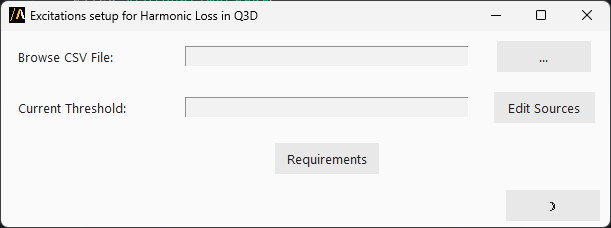
The user must select the CSV file to import and specify the current threshold to filter the data.
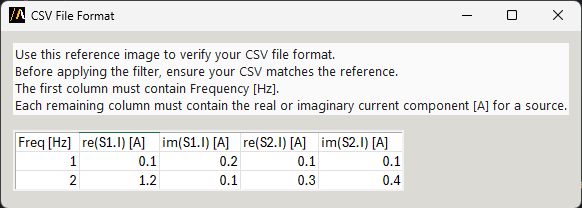
The CSV file must follow the format of the output CSV file generated by the transient analysis in either Ansys Circuit or Ansys Twin builder.
The CSV file must contain the following columns: Spectrum[Hz], re(source_name.I) [A], and im(source_name.I) [A] (real and imaginary parts of the current for each source).
An example can be found by clicking the button Requirements in the extension user interface.
The extension saves a CSV file with the filtered data in the project working directory and saves real and imaginary part in separate tab-separated files. Each .tab file contains two columns: frequency and the corresponding part (real or imaginary). Each .tab file is imported as a design dataset in Q3D and the extension edits the Q3D sources with the imported design datasets.