

Interference classification#
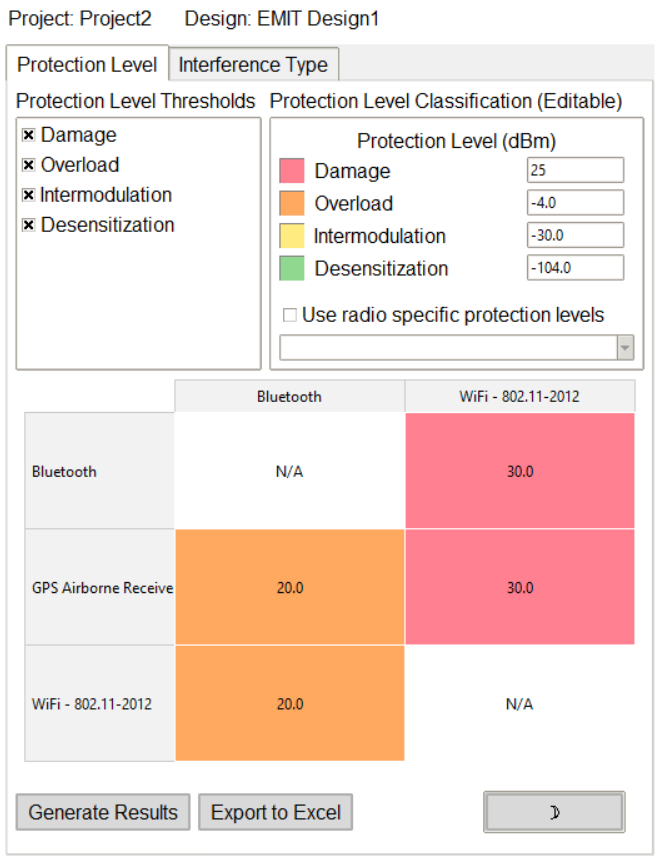
The Interference classification extension allows users to classify simulation results based on radio protection level and interference types.
The extension provides a Graphical User Interface (GUI) for configuration.
The following image shows the extension GUI:
Features#
Configure radio specific or global protection levels.
Export formatted results to Excel.
Switch between light and dark themes in the GUI.
Using the extension#
Open the Automation tab in the EMIT interface.
Locate and click the Interference classification icon under the Extension Manager.
In the GUI, users can interact with the following options: - Adjust global radio protection levels in the protection legend. - Specify radio specific protection levels using the radio dropdown. - Specify the type of interference to classify using the filter checkboxes.
Use the buttons at the bottom to: - Generate the results matrix - Export results to Excel